Intelligent Live Updates & Notifications in Your MacBook Notch
NotchDock transforms your MacBook screen notch into an ambient live activity center and silent notification tray. Stay effortlessly informed with live sports scores, real-time stock tickers, meeting countdowns, clipboard history, and media controls — without noisy popup banners or menu bar clutter. 100% on-device and private.
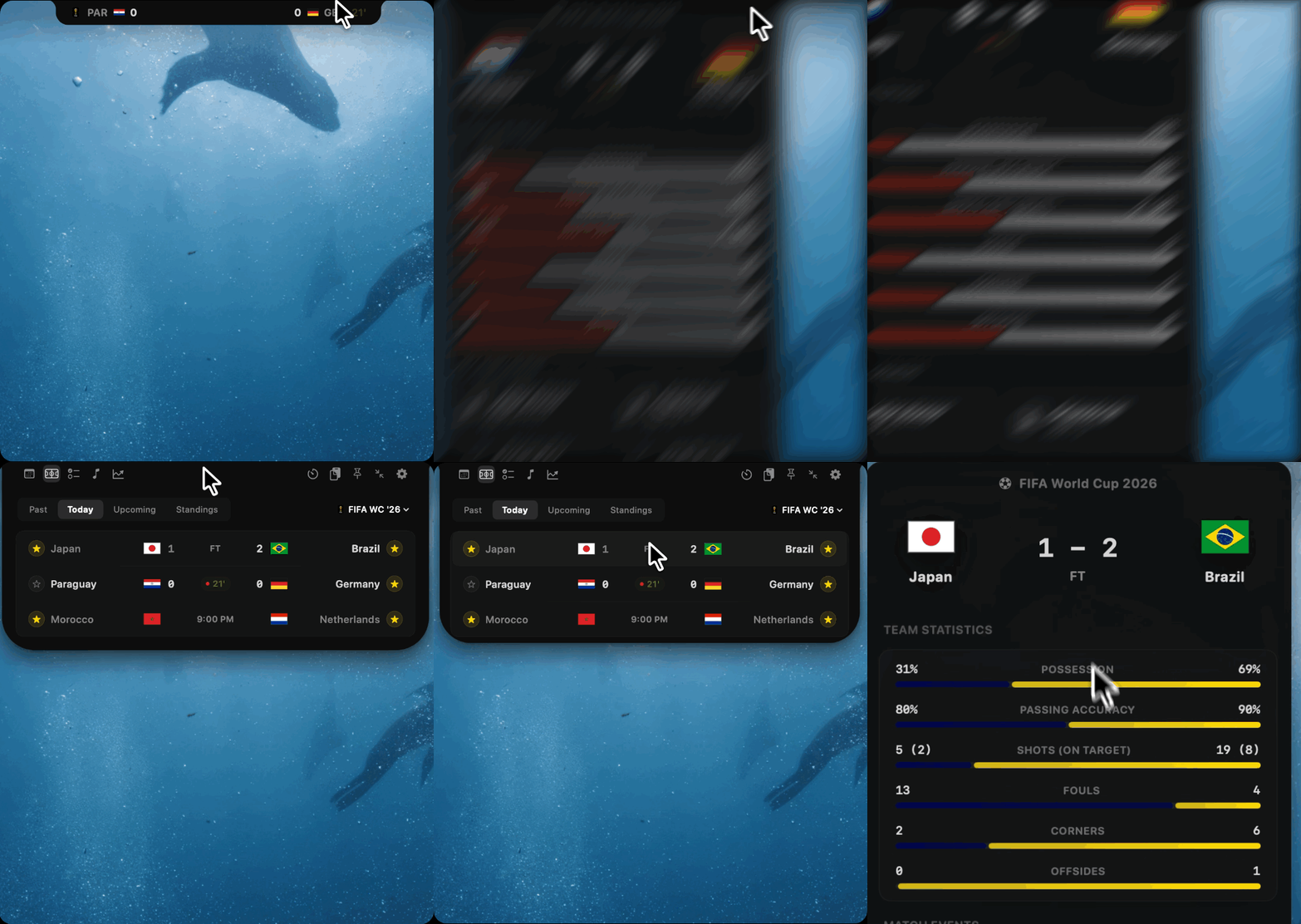
A Widget for Every Need
Try using the widgets below to experience how NotchDock adapts to your workflow.
Engineered for Focus & Live Intelligence
Real-time status updates that stay discreet until you need them.
Intelligent Live Updates
Glanceable micro-updates for sports scores, stock price action, and meeting countdowns embedded directly into the MacBook notch bezel.
Silent Notch Notifications
Context-aware ambient indicators that eliminate noisy banner popups and screen-recording interruptions during deep work.
Live Match Scoreboards
Follow Premier League, NFL, NBA, MLB, Champions League, and world tournaments with automated real-time ticker feeds.
Intraday Stocks & Crypto
Track equities, global indices (S&P 500, NASDAQ), commodities, and crypto with custom sparkline charts and gain indicators.
Meeting Agenda & Timers
Syncs with macOS Calendars to highlight your next standup, meeting countdown, or Pomodoro focus session.
Quick Access Clipboard
Store snippets, code snippets, SSH logins, and formatted text. One-click copy makes drafting emails and commands instant.
Universal Music Control
Play, pause, skip, and see live track progress for Spotify, Apple Music, and web feeds without switching active windows.
100% Local & Zero Cloud
Every widget runs strictly on your Mac. No cloud telemetry, no accounts required, and zero user data leaves your machine.
Setup in 3 Steps
Download
Grab the latest release DMG package directly from our landing page.
Grant Permission
Drag to Applications and grant accessibility permission in macOS Settings so hover coordinates can be tracked.
Hover & Reveal
Hover near your MacBook notch to open the intelligent live status dock.
Built Different for macOS Power Users
Reinventing hardware dead space into an intelligent, ambient notification surface.
Intelligent Ambient Notifications vs Banner Fatigue
Say goodbye to annoying top-right notification banners that break your coding flow, pop up during client presentations, or clutter your notification center. NotchDock keeps updates silent and glanceable.
Hardware Dead Space → Active Dock
Your camera notch sits idle 99% of the time. NotchDock turns that wasted screen real estate into a hover-activated tray packed with live widgets and productivity tools.
100% Local & Private Execution
Your clipboard snippets, stock holdings, notes, and task lists stay strictly on your Mac. No cloud tracking, no accounts required, and zero telemetry transmitted off-device.
NotchDock vs Other Mac Notch Apps
How NotchDock compares to NotchNook, Boring Notch, Seam, and Alcove.
| Capability | NotchDock | NotchNook | Boring Notch | Seam / Alcove |
|---|---|---|---|---|
| Pricing & License | Freemium | $25 (Paid License) | Free / Open Source | Freemium / Paid |
| Intelligent Live Updates (Sports & Stocks) | Real-time Tickers + Sparklines | None | None | None |
| Silent Ambient Notch Notifications | Built-in (No Banner Fatigue) | None | None | None |
| Mac Clipboard Manager | Full History & Snippets | File Shelf Only | None | None |
| 100% Local & Privacy-First | 0 Cloud Telemetry | Online auth check | Local | Cloud metrics |
Loved by 100+ Beta Testers
See what early users think of their new interactive notch experience.
Frequently Asked Questions
Everything you need to know about NotchDock on macOS.
What is NotchDock and how do intelligent notifications work?
NotchDock is a lightweight macOS desktop application that turns your MacBook hardware camera notch into an intelligent live update center and silent notification tray. Instead of noisy top-right banner popups, NotchDock displays subtle status indicators (pulse dots, live scores, stock price moves, meeting timers) directly in the black bezel area. Hovering your mouse reveals expanded controls and widgets.
How does NotchDock provide live updates for sports and stocks?
NotchDock pulls automated real-time feeds for Premier League, Champions League, NFL, NBA, MLB, and global stock markets (S&P 500, NASDAQ, crypto). It updates intraday metrics and scores silently in the background, making them instantly visible with a quick glance or mouse hover over your notch.
Why is NotchDock better than standard macOS notifications?
Standard macOS notifications are intrusive banners that interrupt your focus, pop up during screen shares, and clutter your Notification Center. NotchDock uses ambient micro-status indicators inside the camera notch bezel, allowing you to stay updated on what matters with zero chime distractions or banner interruptions.
Which Mac models and macOS versions are supported?
NotchDock supports all MacBooks running macOS Monterey (12.0) or newer, including macOS Ventura, macOS Sonoma, and macOS Sequoia. It runs natively on Apple Silicon (M1, M2, M3, M4) MacBook Pro & MacBook Air, as well as Intel Macs.
Is NotchDock private, secure, and free?
Yes! NotchDock is completely free during public beta. It operates 100% on-device with zero cloud server dependencies, zero tracking, and zero data collection. Your clipboard text and stock watchlists never leave your Mac.
Ready to transform your screen?
Download NotchDock today and turn your MacBook notch into your intelligent live status dock.
Free for personal use. Built with security and sandbox standards on macOS.